AI agents for customer service: 13 best platforms compared (2026)
Empower your support team and scale resolutions with the industry’s top AI agents for customer service.



Candace Marshall
Vice President, Product Marketing, AI and Automation
最後更新: October 14, 2026
A guide to the top 13 AI agents
AI agents for customer service are software systems that understand customer requests, retrieve information, take actions, and resolve issues with minimal human intervention. Unlike traditional chatbots, AI customer service agents can manage complex conversations, complete multi-step tasks, and hand off issues to human agents when needed.
This guide compares 13 AI agents for customer service based on features, pricing, integrations, automation capabilities, scalability, and ease of implementation.
Key takeaways
- AI customer service agents go beyond scripted chatbots by understanding intent, retrieving knowledge, taking action, and resolving issues across channels.
- The best AI agents connect to knowledge, ticketing, workflows, customer data, quality assurance, and analytics so automation can improve over time.
- Zendesk AI agents are built into the Zendesk Resolution Platform and designed for resolution-first service across channels, with reasoning visibility, built-in QA, and human handoff.
- Pricing models vary by platform, so businesses should compare what counts as a resolution, conversation, interaction, or agent seat before choosing a vendor.
- Successful implementation depends on strong knowledge, connected systems, clear escalation paths, security controls, and ongoing performance measurement.
More in this guide:
- What are AI agents for customer service?
- How do AI customer service agents work?
- Benefits of AI agents for customer service
- Quick comparison: 13 best AI agents for customer service
- Best AI agents for customer service, ranked
- How to choose the right AI agent for your customer service
- Common implementation challenges for AI customer service agents
- Frequently asked questions
What are AI agents for customer service?
An evolution from traditional customer service chatbots, AI agents are intelligent bots designed to understand and autonomously resolve customer issues via any channel. Powered by agentic AI, they can reason, adapt, and act independently. They effectively detect a customer’s intent and provide the right resolution.
Unlike traditional bots, AI agents interact with customers in dynamic, human-like conversations, guiding them all the way to a solution, with or without human assistance.
The best AI customer service agents feature the following core capabilities:
- End-to-end resolution without rigid scripts.
- System-level actions like processing refunds or updating customer data.
- Intent understanding for more human, personalized responses.
- Omnichannel support across digital and voice channels.
- Multilingual coverage to support global customers at scale.
How do AI customer service agents work?
AI customer service agents interpret a customer’s request, find the right information, decide the best next step, and resolve the issue through an answer, action, or human handoff. The strongest AI agents use approved knowledge sources, customer context, business rules, and connected workflows to manage service requests from start to finish.
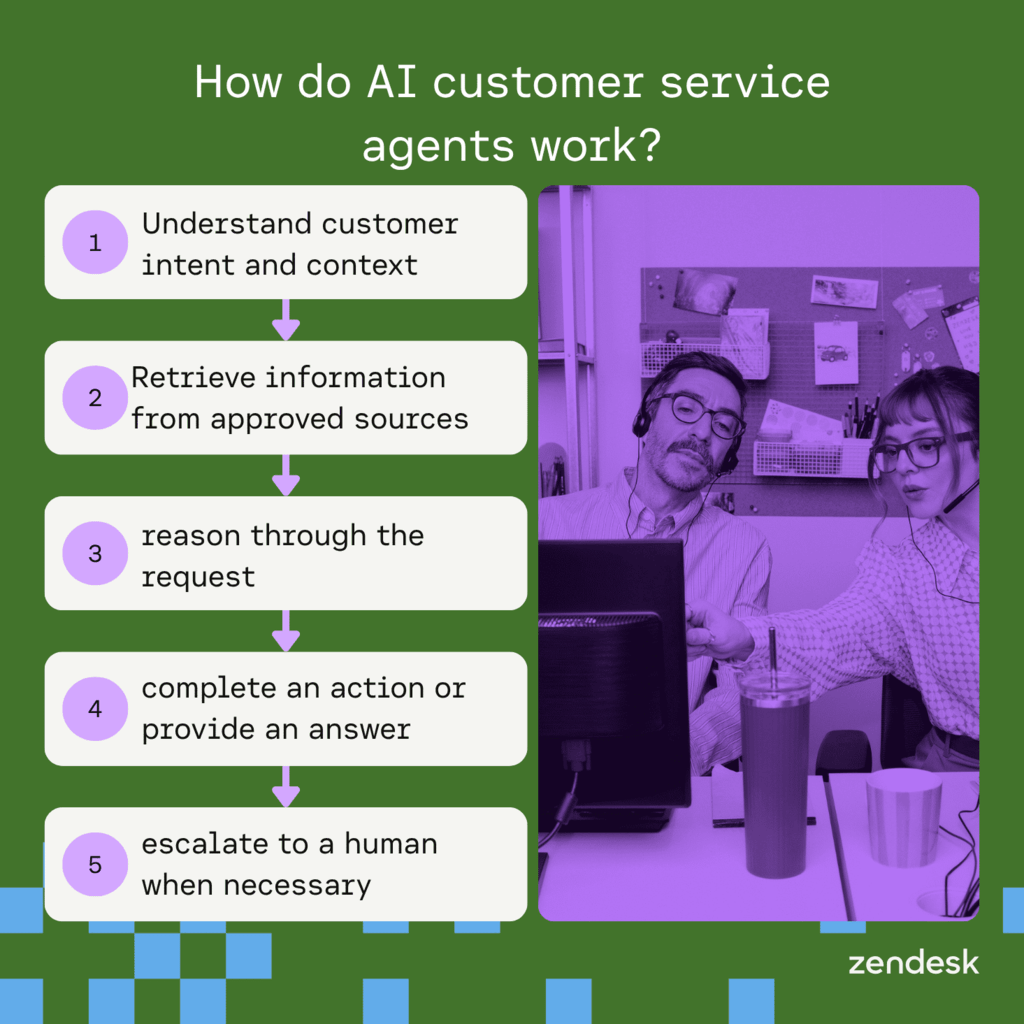
Here’s how the process typically works:
- Understand customer intent and context: The AI agent identifies the customer’s intent, sentiment, language, and context so it can respond accurately.
- Retrieve information from approved sources: It retrieves answers from approved sources, such as a help center, knowledge base, policies, customer records, or connected tools.
- Reason through the request: The AI agent uses business rules, context, and available information to determine the right path to resolution.
- Complete an action or provide an answer: It provides an answer or completes an action, such as checking an order, updating an account, routing a ticket, or processing a refund.
- Escalate to a human when necessary: For complex or sensitive issues, the AI agent escalates to a human agent with the conversation history and customer context.
Benefits of AI agents for customer service
AI agents are the fastest path for enterprise and mid-market teams to improve customer experience while controlling costs. The benefits of AI agents for customer service are many, and with Zendesk AI agents, you get these benefits as part of Zendesk’s Resolution Platform. This means agents work across your full support stack—tickets, Copilot, knowledge base, QA, and analytics—to drive real resolutions end to end.
The benefits of AI agents for customer service include:
- Cost reduction and efficiency, as automating interactions reduces operational costs and frees up human agents for high-value work.
- Improved CSAT and CX, as you can deliver 24/7, instant, personalized support to meet customers’ expectations.
- Scalability without linear headcount growth, as you can handle rising ticket volume smoothly.
- Complex request resolution without scripts, as agentic AI can orchestrate steps across systems and adapt in real time.
- Continuously improved quality, as built-in QA, transparent reasoning, and step-level tuning help you see what’s working, fix what isn’t, and keep accuracy and reliability high.
- Increased ROI with AI-powered insights that surface new automation opportunities like trending issues, new regions, and new teams.
Look for an AI customer service agent platform that delivers the benefits most relevant to your goals, whether that’s reducing costs, improving CSAT, scaling support, or resolving complex requests with less manual work.
Quick comparison: 13 Best AI agents for customer service
Use the chart below to compare the 13 best AI agents for customer service across pricing, channels, autonomous actions, and escalation support. Zendesk AI agents are built for resolution-first service, with automation, knowledge, workflows, analytics, quality assurance, and human handoff connected in one platform.
Pricing and feature availability may vary by plan and region. Verify details with each vendor before purchasing.
AI agent | Best for | Pricing model | Primary channels | Autonomous actions | Human handoff |
Zendesk AI | Automating complex customer service resolutions across every channel | Per resolution; from $1.50 per resolution* | Messaging, email, voice, web, mobile, social | Multi-step workflows, routing, classification, refunds, account updates | Yes, with conversation context |
Freshdesk Freddy AI | Predictive ticket routing and routine query resolution | Per agent/month; from $29* | Email, chat, phone | Routing, workflow automation, self-service | Yes |
Intercom Fin | Contextual, conversational chat automation | Per resolution; from $0.99* | Chat, help center, web | Knowledge retrieval, automated answers, deflection | Yes |
ServiceNow Virtual Agent | IT service workflows and enterprise automation | Custom pricing | Chat, Teams, Slack, web | Password resets, hardware requests, internal workflows | Yes |
Salesforce Agentforce | CRM automation and personalized customer engagement | Per conversation; from $2* | Digital channels, web, CRM-connected channels | Multi-step tasks, returns, lead qualification, CRM actions | Yes |
Microsoft Dynamics 365 | Integrated omnichannel support | Per user/month; from $50* | Email, chat, social, voice | Routing, case assistance, CRM workflows | Yes |
LivePerson Conversational Cloud | Conversational commerce and messaging strategies | Custom pricing | SMS, WhatsApp, Apple Messages, Messenger | Intent flows, conversational workflows, commerce actions | Yes |
Ada AI | Handling high-volume queries autonomously | Custom pricing | Messaging, social, voice | FAQ automation, self-service workflows | Yes |
IBM watsonx Assistant | Complex support ecosystems | Free and custom tiers | Web, mobile, SMS/MMS, phone | Task workflows, intent clarification, backend actions | Yes |
Genesys | Contact center orchestration | Per user/month; from $75* | Digital and voice channels | Predictive routing, proactive engagement, summaries | Yes |
Boost.ai | Advanced performance analytics | Custom pricing | Digital channels; verify | Intent recognition, conversational flows | Yes |
Cognigy.ai | Multilingual chat automation | Custom pricing | 30+ channels; verify | AI agent workflows, translation, orchestration | Yes |
Tidio | Fast chatbot setup | Monthly conversation tier; from $24.17* | Chat, web, social; verify | FAQ automation and routine responses | Yes |
Best AI agents for customer service, ranked
- Zendesk AI: Best for automating complex customer service resolutions across every channel
- Freshdesk Freddy AI: Best for predictive ticket routing and routine query resolution
- Intercom Fin: Best for contextual, conversational chat automation
- ServiceNow Virtual Agent: Best for IT service workflows and enterprise automation
- Salesforce Agentforce: Best for CRM automation and personalized customer engagement
- Microsoft Dynamics 365 Customer Service: Best for integrated omnichannel support
- LivePerson Conversational Cloud: Best for conversational commerce and messaging strategies
- Ada AI: Best for handling high-volume queries autonomously
- IBM watsonx Assistant: Best for complex support ecosystems
- Genesys: Best for contact center orchestration
- Boost.ai: Best for advanced performance analytics
- Cognigy.ai: Best for multilingual chat automation
- Tidio: Best for fast chatbot setup
1. Zendesk AI
Best for
Automating complex customer service resolutions across every channel
Quick facts
- Pricing: From $1.50 per resolution
- Channels: Messaging, email, voice, web, mobile, and social
- Key features: AI agent builder, workflow automation, knowledge-grounded answers, QA, analytics, and voice AI
- Human handoff: Yes, with conversation context
Why we picked it
Zendesk AI agents are built for customer service teams that need to automate more than simple FAQs. They can understand customer intent, retrieve trusted knowledge, follow service workflows, take action across systems, and escalate to human agents with context.
Built into the Zendesk Resolution Platform, Zendesk AI agents support multi-step resolutions across channels. They can automate tasks like routing, classification, refunds, and account updates while giving teams visibility into AI performance through QA, analytics, and transparent decisioning.
Pros | Cons |
|
|
Best use cases
- Order and account questions
- Returns and refunds
- Ticket classification and routing
- Knowledge-based self-service
- Multi-step service workflows
- Omnichannel customer support
What people are saying:
- “I find Zendesk to be a very convenient tool. It is easy to access, and everything is clearly detailed and well organized.”
- “It is user-friendly with AI for integrating multichannel support.”
- “All-in-one tool to support our clients in different channels.”
Learn more:
Explore more Zendesk pricing plans and experience the Zendesk AI effect with an interactive AI agent demo.
2. Freshdesk Freddy AI
Best for
Predictive ticket routing and routine query resolution
Quick facts
- Pricing: Per agent/month; from $29
- Channels: Email, chat, phone
- Key features: Ticket routing, workflow automation, self-service, summaries, and AI assistance
- Human handoff: Yes
Why we picked it
Freshdesk Freddy AI is a practical option for teams that want to improve ticket handling and agent productivity. It supports routing, workflow automation, ticket summaries, and self-service experiences across Freshdesk products.
Freddy AI works best for teams that need to automate routine service tasks without rebuilding their support operations. It can support queue management, prioritization, and channel-specific workflows within Freshdesk.
Pros | Cons |
|
|
Best use cases
- Routine customer questions
- Ticket routing and prioritization
- Agent productivity workflows
- Self-service automation
- Ticket summaries and response support
What people are saying:
- “The UI is interactive and easy to get started.”
- “Freshdesk offers an intuitive interface and excellent api support, making it easy to integrate with other tools in our workflow.”
- “What I dislike about Freshdesk is that some features feel a bit limited unless you’re on the higher pricing tiers.”
Learn more:
Discover how Zendesk vs. Freshdesk compare.
3. Intercom Fin
Best for
Contextual, conversational chat automation
Quick facts
- Pricing: Per resolution; from $0.99
- Channels: Chat, help center, web
- Key features: Generative answers, public help center content, omnichannel inbox, tickets, and automation
- Human handoff: Yes
Why we picked it
Intercom Fin is built for chat-first customer self-service. It answers customer questions using connected support content, then charges based on successful Fin outcomes or resolutions.
Fin is a strong fit for teams that want conversational automation tied closely to Intercom’s help desk, messenger, help center, and inbox. It can also be purchased for use with external help desks.
Pros | Cons |
|
|
Best use cases
- Chat-based self-service
- Help center answer automation
- Common product questions
- Support deflection
- Conversational customer support
What people are saying:
- “Fin learns quickly, continuously improving its ability to provide accurate and relevant answers.”
- “Despite its advanced capabilities, Fin can still struggle with highly intricate, multi-layered queries that require a deeper level of human understanding or judgment.”
- “Fin doesn't achieve a 65% resolution rate like Intercom guarantees, it only achieves 50.7%, and in truth, it's much lower since we often have to intervene and rescue conversations where Fin is unhelpful or hallucinates.”
Learn more: Discover how Intercom integrates with Zendesk and/or how Zendesk vs. Intercom compare.
4. ServiceNow Virtual Agent
Best for
IT service workflows and enterprise automation
Quick facts
- Pricing: Custom pricing
- Channels: Chat, Teams, Slack, web
- Key features: IT workflows, service catalog requests, employee support, AI workflows, and third-party channel integrations
- Human handoff: Yes
Why we picked it
ServiceNow Virtual Agent is built for enterprise teams that need to automate internal service requests. It connects conversational experiences with ServiceNow workflows, service catalog requests, and IT service management processes.
It’s a strong fit for organizations already using ServiceNow for IT, HR, or employee service. Virtual Agent can extend to Slack, Microsoft Teams, portals, and apps.
Pros | Cons |
|
|
Best use cases
- IT service requests
- Password resets
- Hardware requests
- Employee support workflows
- Service catalog automation
What people are saying:
- “ServiceNow AI Agents make automation feel effortless.”
- “While ServiceNow AI Agents are powerful, the setup and tuning process can feel complex at first—especially when mapping intents and integrating with existing workflows.”
- “It’s harder to create very domain-specific reasoning or fully custom workflows.”
Learn more:
Discover how Zendesk vs. ServiceNow compare.
5. Salesforce Agentforce
Best for
CRM automation and personalized customer engagement
Quick facts
- Pricing: Per conversation; from $2
- Channels: Digital channels, web, CRM-connected channels
- Key features: Agent builder, CRM actions, service automation, sales workflows, marketing workflows, and commerce use cases
- Human handoff: Yes
Why we picked it
Salesforce Agentforce is designed for teams that want autonomous agents inside Salesforce. It supports service, sales, marketing, commerce, Slack, and other CRM-connected use cases.
Agentforce is a natural fit for organizations already invested in Salesforce Customer 360. Its agents can perform CRM-connected tasks across service and revenue workflows.
Pros | Cons |
|
|
Best use cases
- CRM-connected service automation
- Lead qualification
- Returns and service requests
- Appointment scheduling
- Customer engagement workflows
What people are saying:
- “It’s especially effective for automating workflows, managing customer interactions, and scaling support operations without needing a deep technical background.”
- “While the functionality is impressive, the initial configuration can be complex.”
- “Some tasks feel repetitive and could be more automated.”
Learn more: Discover how Salesforce integrates with Zendesk and how Zendesk vs. Salesforce compare.
6. Microsoft Dynamics 365 Customer Service
Best for
Integrated omnichannel support
Quick facts
- Pricing: Per user/month; from $50
- Channels: Email, chat, social, voice
- Key features: Omnichannel service, Copilot, case management, analytics, forecasting, and CRM workflows
- Human handoff: Yes
Why we picked it
Microsoft Dynamics 365 Customer Service is a strong fit for teams already using Microsoft business applications. It supports omnichannel service, case management, AI-powered insights, and customer journey visibility.
For organizations using Microsoft’s contact center and Copilot ecosystem, Dynamics 365 can connect customer service workflows across digital channels, voice, analytics, and agent productivity tools.
Pros | Cons |
|
|
Best use cases
- Omnichannel support
- CRM-based service workflows
- Case management
- Contact center analytics
- Microsoft-connected support operations
What people are saying:
- “Ultra high customizability when teamed up with a development partner team.”
- “For smaller companies, the initial complexity of implementation and configuration can be challenging.”
- “The interface could be more user-friendly.”
Learn more: Discover how Zendesk vs. Microsoft Dynamics 365 compare.
7. LivePerson Conversational Cloud
Best for
Conversational commerce and messaging strategies
Quick facts
- Pricing: Custom pricing
- Channels: SMS, WhatsApp, Apple Messages for Business, Messenger
- Key features: Omnichannel messaging, conversational AI, dynamic routing, conversation context, and commerce workflows
- Human handoff: Yes
Why we picked it
LivePerson Conversational Cloud is built for brands that rely on messaging-heavy customer engagement. It supports channels like web, app, SMS, WhatsApp, Apple Messages for Business, Messenger, Instagram, RCS, Line, Viber, WeChat, and more.
It’s a strong fit for companies that want to shift customers from voice to messaging and manage digital conversations through one conversational AI platform.
Pros | Cons |
|
|
Best use cases
- WhatsApp and SMS support
- Conversational commerce
- Social messaging
- Voice-to-messaging deflection
- High-volume digital engagement
What people are saying:
- “[It has an] amazing interface.”
- “The learning curve can be steep for new users trying to set up advanced features like automation flows.”
- “It is a difficult and complex product, so you will need to train a person or two to navigate it.”
Learn more: Discover how Zendesk vs. LivePerson compare.
8. Ada AI
Best for
Handling high-volume queries autonomously
Quick facts
- Pricing: Custom pricing
- Channels: Messaging, social, voice
- Key features: No-code AI agent management, omnichannel automation, playbooks, safeguards, integrations, and human handoff
- Human handoff: Yes
Why we picked it
Ada AI is built for teams that want to automate customer service across chat, email, voice, SMS, social, and in-app channels. Its AI agent learns from knowledge bases, websites, and articles, then transfers customers to human agents when needed.
Ada is a strong fit for teams that want non-technical control over customer-facing automation. Its unified reasoning layer applies policies and safeguards across channels.
Pros | Cons |
|
|
Best use cases
- High-volume support questions
- No-code automation
- Voice and messaging automation
- Customer self-service
- Human handoff workflows
What people are saying:
- “The solution is easy and useful, and the reports are insightful.”
- “Ada's implementation and maintenance were quite a heavy lift.”
- “When gathering data, I often see conflicting numbers, which makes it hard to measure the effectiveness of the bot.”
Learn more: Discover how Ada integrates with Zendesk.
9. IBM watsonx Assistant
Best for
Complex support ecosystems
Quick facts
- Pricing: Free and custom tiers
- Channels: Web, mobile, SMS/MMS, phone
- Key features: Custom assistants, web chat, phone integration, SMS integration, branded interfaces, and support handoff
- Human handoff: Yes
Why we picked it
IBM watsonx Assistant is a configurable platform for building AI assistants across devices, applications, and channels. It supports web chat, phone, SMS, custom applications, and handoff to support teams.
It’s a strong fit for larger organizations with complex environments and technical teams that need flexible deployment options across customer service channels.
Pros | Cons |
|
|
Best use cases
- Enterprise self-service
- Custom chatbot deployment
- Web and mobile assistants
- Phone and SMS support
- Complex backend integrations
What people are saying:
- “Reliable AI platform with strong enterprise capabilities.”
- “I found the documentation a bit overwhelming at first.”
- “The pricing can get high if you scale quickly.”
Learn more:
Discover how the IBM Watson Assistant App integrates with Zendesk.
10. Genesys
Best for
Contact center orchestration
Quick facts
- Pricing: Per user/month; from $75
- Channels: Digital and voice channels
- Key features: Predictive routing, bots, virtual agents, workforce tools, journey orchestration, and AI Experience add-ons
- Human handoff: Yes
Why we picked it
Genesys Cloud CX is built for contact centers that need to coordinate voice, digital, routing, workforce engagement, and AI tools. Its pricing structure includes voice and digital plans, with AI Experience tokens for features like Virtual Agent and predictive routing.
Genesys is a strong fit for large contact centers that need orchestration across digital and voice journeys. It can support routing, bots, social channels, and agent-facing AI capabilities.
Pros | Cons |
|
|
Best use cases
- Enterprise contact centers
- Voice and digital routing
- Predictive engagement
- Workforce optimization
- AI-assisted contact center operations
What people are saying:
- “Genesys Cloud strikes a balance between ease of use and functionality.”
- “Implementation costs were a bit high due to legacy infrastructure.”
- “Not designed for complex contact centers.”
Learn more: Discover how the Genesys Cloud App integrates with Zendesk and how Zendesk vs. Genesys compare.
11. Boost.ai
Best for
Advanced performance analytics
Quick facts
- Pricing: Custom pricing
- Channels: Digital channels; verify
- Key features: Virtual agents, no-code automation, chat automation, voice AI, analytics, and multi-agent orchestration
- Human handoff: Yes
Why we picked it
Boost.ai is built for enterprise conversational AI across customer service and internal support. Its platform emphasizes no-code AI agent development, chat automation, voice AI, analytics, and continuous optimization.
It’s a strong fit for teams that want to monitor performance closely and improve automation over time. Boost.ai also supports more advanced agentic workflows across channels and business systems.
Pros | Cons |
|
|
Best use cases
- AI performance monitoring
- Customer self-service
- Internal support automation
- Voice and chat automation
- Multi-agent workflows
What people are saying:
- “I'm impressed by the pace of development and Boost's ability to release new versions at short intervals.”
- “The solution could be more configurable for the admins and developers.”
- “At times, Boost.ai did not detect the right type of query which meant that it left some people frustrated.”
Learn more:
See why Phonero chose Zendesk over Boost.ai.
12. Cognigy.ai
Best for
Multilingual chat automation
Quick facts
- Pricing: Custom pricing
- Channels: 30+ channels; verify
- Key features: AI agents, voice gateway, webchat, multilingual voice, third-party endpoints, and enterprise integrations
- Human handoff: Yes
Why we picked it
Cognigy.ai is designed for enterprise AI agents across voice and text channels. It supports endpoints such as webchat, Voice Gateway, REST, and third-party integrations.
It’s a strong fit for teams that need flexible channel deployment and multilingual voice experiences. Cognigy supports channels like Facebook Messenger, Slack, Amazon Alexa, Microsoft Teams, WhatsApp, Genesys, and Cognigy Voice Gateway.
Pros | Cons |
|
|
Best use cases
- Multilingual customer support
- Voice AI agents
- Enterprise chat automation
- Contact center integrations
- Complex conversational workflows
What people are saying:
- “The support from the Cognigy team has been exceptional, assisting us with project implementation, troubleshooting, and connecting us with other parts of the Cognigy ecosystem.”
- “Lack of ready-made templates to accelerate the development of virtual assistants.”
- “(...) It does not support an extensive workflow.”
13. Tidio
Best for
Fast chatbot setup
Quick facts
- Pricing: Monthly conversation tier; from $24.17
- Channels: Chat, web, social; verify
- Key features: Lyro AI Agent, live chat, flows, website training, email resolutions, product recommendations, and data-backed answers
- Human handoff: Yes
Why we picked it
Tidio is a lightweight option for small and midsize businesses that want live chat and AI automation in one tool. Its Lyro AI Agent can answer from website, help center, product, and other business data.
Tidio works best for teams that need fast setup and affordable automation. Lyro is available through Tidio’s AI agent plans and can run on integrated channels.
Pros | Cons |
|
|
Best use cases
- Small business support
- Website chat automation
- Routine questions
- Product recommendations
- Live chat plus AI handoff
What people are saying:
- “On the top of all features, Tidio now offers Lyro AI agent, it can automatically create knowledge base from your website and answer to customers more accurately, the conversation can be easily be transferred to human operator back and forth.”
- “One of the main feature of Tidio is its chatbot automation and this feature cannot be accessed in the free plan also the trial version period of Tidio is also short.”
- “I also find that customization options feel somewhat restricted.”
Key features to look for in AI customer service agents
The best AI agents for customer service go far beyond basic automation. They combine conversational intelligence, action, and governance to deliver reliable resolutions at scale.
Here are the essential features to look for:
- Natural language understanding: Accurate understanding of intent, sentiment, and context for more human, relevant responses.
- Knowledge retrieval: Access to approved sources like help center articles, knowledge bases, policies, and connected systems, to deliver accurate, grounded answers.
- Seamless integrations: Deep connections with helpdesks like Zendesk, CRMs, and backend systems to take real actions, such as checking order status, processing refunds, and updating accounts.
- Agentic reasoning and automation: Independent resolution of complex, multi-step requests without rigid scripts or predefined flows.
- Omnichannel support: Consistent experiences across email, chat, social, mobile, and voice channels.
- Quality assurance and analytics: Built-in QA, interaction scoring, and insights to monitor performance and continuously improve accuracy.
- Security and compliance: Enterprise-grade data protection, privacy controls, and compliance with global standards.
How to choose the right AI agent for customer service
The right AI agent for your customer service is a solution that automates efficiently while valuing human connections. Here are four essential tips to help you make an informed decision.
1. Define your primary goal
Decide what you need to prioritize. You may want to reduce first-response time, lower cost per contact, or increase CSAT. Your priority will shape everything from the channels you launch on to how you measure success.
2. Identify the right use cases
List the customer requests you want the AI agent to resolve first. Start with high-volume, low-risk issues like order status, account updates, returns, refunds, and knowledge-based questions. Then expand into more complex workflows once the agent has proven accuracy and impact.
3. Assess integration requirements
Map your current stack, including your helpdesk, CRM, identity, order management, billing, and knowledge systems. Prioritize AI agents with robust integrations so the agent can access context and take action without creating data silos.
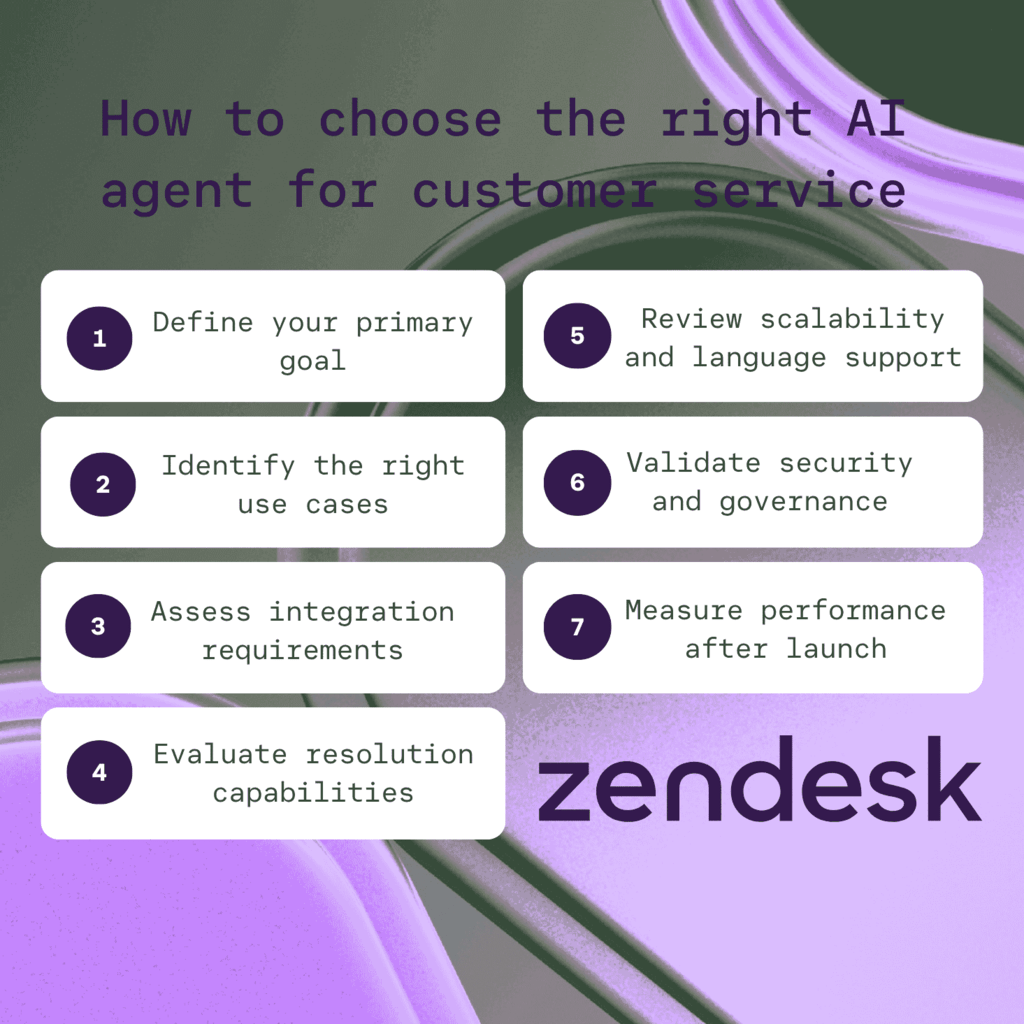
4. Evaluate resolution capabilities
Look beyond basic answer generation. The AI agent should retrieve trusted knowledge, reason through multi-step requests, follow business rules, and take action across connected systems. It should also recognize when a request needs human judgment and escalate with full conversation context.
5. Review scalability and language support
Don’t consider today’s volume only. Make sure the solution supports the channels you run now and the ones you plan to add, along with the languages and regions you’ll expand into without a rebuild.
6. Validate security and governance
Review how the platform protects customer data, controls AI behavior, and gives teams visibility into decisions. Look for permission controls, auditability, compliance support, and clear ways to test, monitor, and refine AI responses before scaling.
7. Measure performance after launch
Track more than containment or deflection. Measure AI resolution rate, escalation rate, CSAT, response time, quality scores, and cost per resolution. Use those insights to improve knowledge, refine workflows, and expand automation over time.
Common implementation challenges for AI customer service agents
Successfully deploying AI agents requires more than picking a tool. It requires a strategic focus on key operational challenges to ensure long-term ROI and customer trust.
Integration complexity: Avoiding data silos
AI agents need access to knowledge, policies, customer context, and operational systems. Without strong integrations, teams can create disconnected data silos that limit accuracy and prevent agents from taking action.
Data quality and governance
The quality of your knowledge and data directly affects AI performance. Establish ownership, permissions, privacy safeguards, and clear review processes before scaling automation.
Human handoff and service design
Complex, emotional, high-stakes, or policy-sensitive issues still require human judgment. Build clear escalation paths that preserve conversation context and transfer issues to the right team at the right time.
Change management and monitoring
AI adoption requires training, measurement, and continuous improvement. Monitor resolution quality, customer satisfaction, failure points, and escalation patterns to keep performance aligned with service standards.
Frequently asked questions
See how AI can resolve over 80% of your service requests with Zendesk
The future of service is autonomous resolution. Zendesk’s AI agents are purpose-built to go beyond simple scripts and resolve up to 80% of interactions without human intervention.
How are your current operations? Are repetitive tasks holding your team back? Discover how Zendesk can help you scale efficiency while freeing up your human agents to focus on high-value connections.
Candace Marshall
Vice President, Product Marketing, AI and Automation
Candace Marshall is a seasoned product marketing leader with a passion for solving complex problems and driving innovation in fast-paced environments. Her career began in operations and research, but her love for understanding customers and translating insights into impactful strategies led her to product marketing. Currently, Candace leads product marketing for Zendesk AI including AI agents and Copilot, driving growth across AI-powered solutions and the core service offerings. Her team delivers end-to-end product marketing strategies, from market validation and messaging to go-to-market execution and customer adoption. Before joining Zendesk, Candace spent nearly a decade at LinkedIn, where she built and led the product marketing team for the rapidly scaling Marketing Solutions division, overseeing key advertising products in the multi-billion-dollar business.
See Zendesk’s AI agents in action
Try Zendesk AI agents for free today to experience truly human-first service.